AI & Data
Agent Skills, Explained
What I taught my team about context windows, why agents forget your instructions, and how a single Markdown file fixes it.
Agent Skills, Explained: The Folder That Made My AI Agent Smarter: A Practical Guide to Agent Skills
What I taught my team about context windows, why agents forget your instructions, and how a single Markdown file fixes it
Every team that adopts an AI coding agent hits the same wall within a few weeks. You explain your project’s conventions to the agent. It does great work. You open a new session the next morning — and it has forgotten everything. So you paste the same instructions again. And again. Your team’s hard-won know-how lives in scattered prompts, chat histories, and one colleague’s notes file.
I recently sat my team down to fix this. The fix is called Agent Skills, and I had built a set of them for our company — the session covered how to install them, how they work, and how to write new ones. But before any of that could land, we had to talk about something more fundamental: why agents behave the way they do in the first place.
First, get the machine right in your head
I’ll say something slightly unfashionable: the biggest productivity unlock with LLMs isn’t a tool or a plugin. It’s having a picture in your head that predicts what the model will do. Most frustration with AI agents comes from a wrong picture — treating the model like a database, or like a colleague with a persistent memory. It’s neither.
Here’s the picture I use.
Picture the model’s training data — every codebase, manual, and forum thread it ever absorbed — as an enormous, dark territory. The model doesn’t “look things up” in that territory. Instead, the words in your prompt act like lamps switching on over certain neighbourhoods. Ask about “web developer” and one neighbourhood glows. Add “add two numbers” and another lights up nearby. The answer you get is the model’s most probable path through the illuminated area — which is why, without ever specifying a language, you’ll almost certainly receive a JavaScript function. You steered it there without saying so.
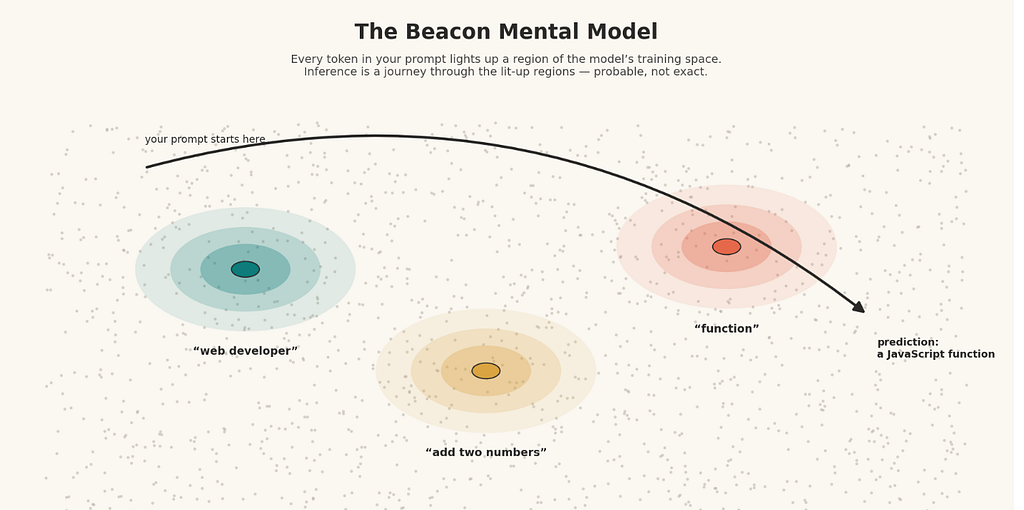
Notice what this picture implies:
You never hand the model a destination — only a direction. Some uncertainty is baked in, always. The same prompt can land in slightly different places on different days.
And the model’s own answers get fed back to it on every turn. Agree with it twice and it will happily agree back; a long conversation slowly bends away from where it started. Practitioners call this drift, and it’s the reason experienced users periodically abandon a long chat and start clean. A fresh session isn’t an inconvenience — it’s a reset of the illuminated territory.
Hold onto this picture. Everything about skills follows from it.
The desk, not the brain
The technical term is context window: the ceiling on how much material — your input plus the model’s output — an LLM can handle in one interaction. But I find “window” misleading. Think of it as a desk. The model can only work with what’s physically on the desk right now. Nothing in a drawer, nothing from yesterday, nothing it “surely must remember.” If it’s not on the desk, it doesn’t exist.
Now, here’s what most people don’t realise about what’s actually on that desk. When you type into Claude Code, Cursor, Windsurf, or Copilot, you’re not addressing the model directly. The agent — the software wrapper — assembles a package before anything reaches the LLM. That package includes a system prompt you never see (the agent’s own standing instructions), the files you’ve attached, tool outputs, and the entire conversation so far. Your carefully worded request is often the smallest item on the desk.
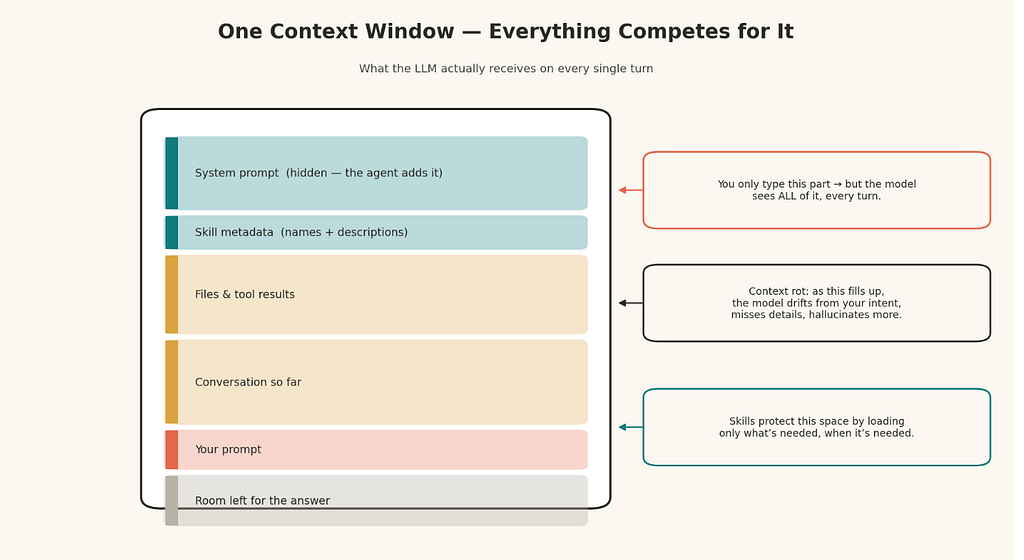
And a crowded desk isn’t just a capacity issue — it’s a quality issue. Ask yourself: how easily do you find one crucial sticky note on a desk buried under two hundred pages? The model faces the same struggle. As the pile grows, three failure modes appear: the model wanders from your original intent, it overlooks details you stated plainly, and it starts inventing things to paper over the gaps. The community has a wonderfully visceral name for this — context rot.
The uncomfortable conclusion: the danger isn’t running out of context. It’s putting things on the desk that never needed to be there.
Enter the skill: know-how in a folder
So the design brief writes itself. We need a way to hand an agent deep, reusable expertise — without piling that expertise onto the desk permanently.
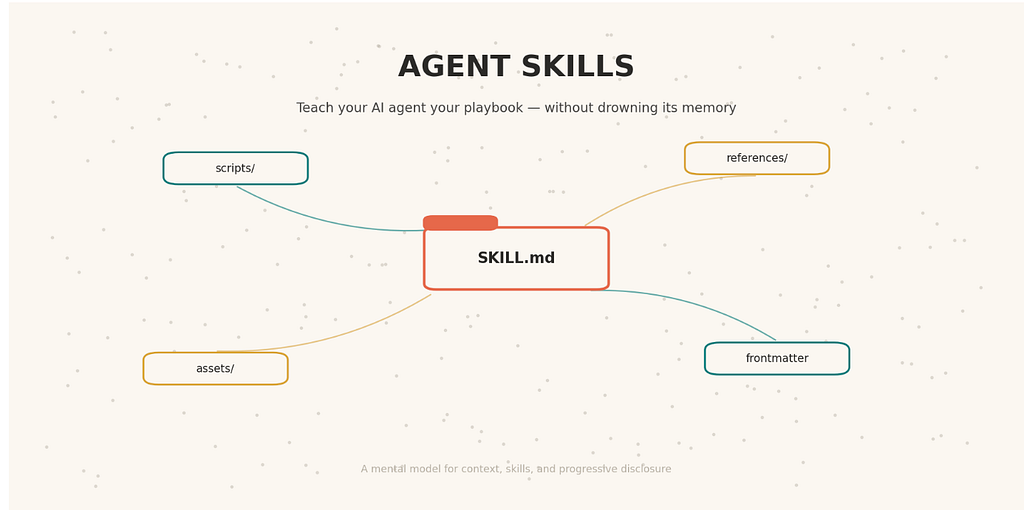
That’s precisely what an Agent Skill is. And structurally, it could hardly be humbler: **a skill is a folder containing a file named **SKILL.md. That's the entire mandatory footprint. The specification is an open standard, which means the identical folder works across any agent that supports it — no vendor lock-in, no rewrites.
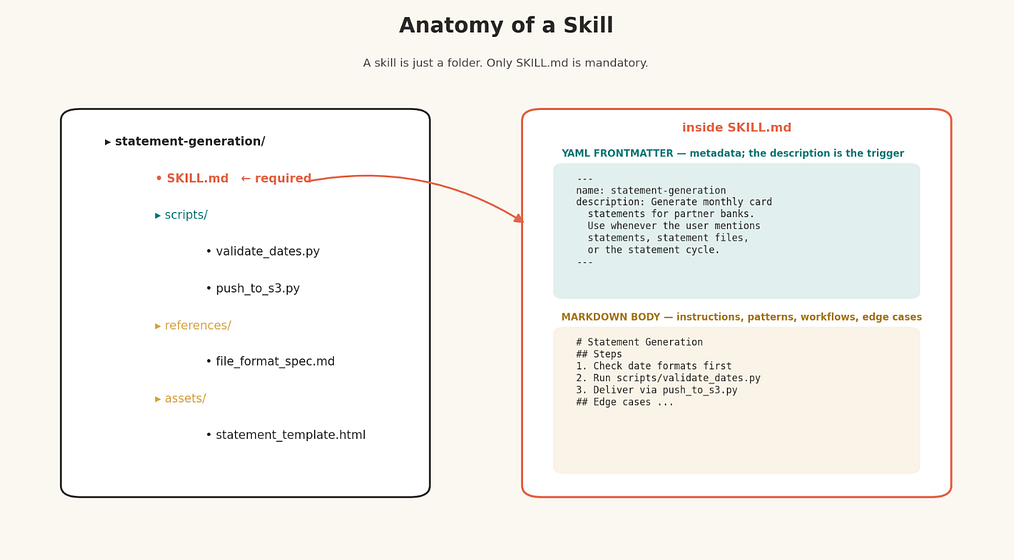
At the top, fenced between two lines of three dashes, sits a small block of YAML: a name and a description. This is the skill's metadata, and the description carries far more weight than its size suggests. It is not documentation — it is a matching signal. The model will later read this line to decide whether the skill applies to the task at hand. So write it the way you'd write a filter: name the exact situations, file types, and phrases that should wake this skill up. A description that says "helps with documents" will never fire; one that says "use whenever the user mentions PDF files, filling forms, or merging documents" will.
Below the metadata comes the body — plain Markdown, no rules imposed. This is where the actual expertise lives: procedures, conventions, gotchas, the order to do things in. Two people will read this file: an LLM under time pressure, and a human maintaining it months later. Serve both. Clear headings, short sections, nothing decorative. Every sentence you write here will eventually be loaded onto the model’s desk, so earn each one.
A skill folder can carry more than the one file. You can ship runnable scripts alongside it (write defensive error messages — an agent, not a human, will be the one debugging them), plus reference documents, templates, and data files the instructions can point to. I’ve seen skills that wrap a company’s brand guidelines, skills that automate a compliance checklist, skills that encode an entire deployment ritual. The container is generic; what you pour into it is up to you.
The one design idea that carries everything
If you take a single concept from this article, take this one: progressive disclosure — the discipline of revealing information in stages, only as it becomes relevant.
It’s how good software onboarding works, and it’s exactly how a new hire learns your company: on day one they get a one-line summary of each department; they read the full playbook only when a project demands it; they open the archived files only when a specific question sends them there. Nobody hands a new joiner every document the company has ever produced on their first morning. Yet that’s precisely what naive prompt-stuffing does to an LLM.
Skills bake the sane alternative into their architecture, in three tiers:
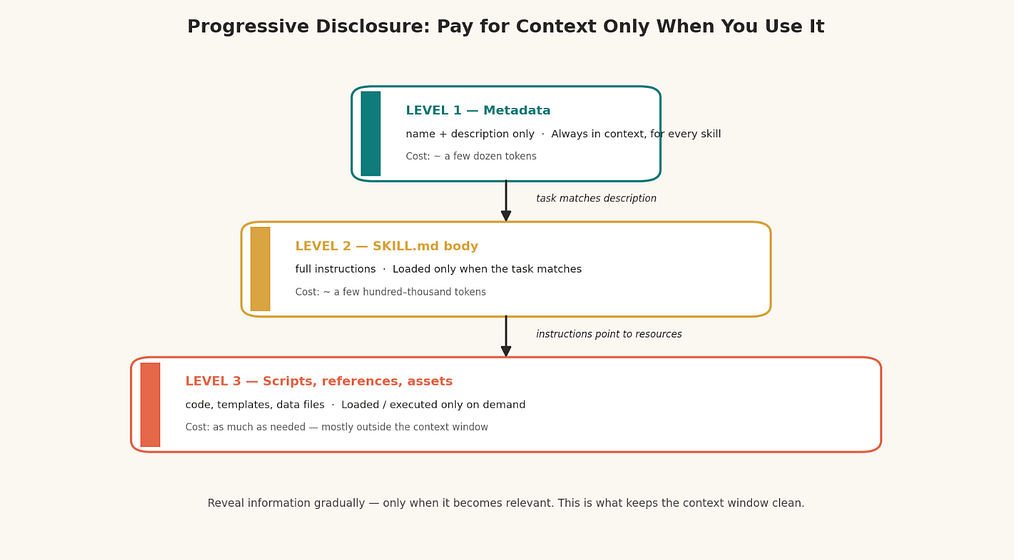
The first tier is nearly free: only each skill’s name and description ride along in every session — a few dozen tokens per skill, even if you’ve installed fifty. The second tier is conditional: the full SKILL.md body lands on the desk only after the model concludes the current task matches. The third tier is on demand: scripts execute and reference files load only when the instructions call for them — and a script's code never occupies the desk at all, only whatever output it returns.
The result: expertise that costs almost nothing until the moment it’s used. Context stays clean; rot stays away.
What the agent actually does with your folder
I find people write far better skills once they’ve seen the machinery from the agent’s side. So here’s the pipeline, step by step, as if you were the engineer implementing it.
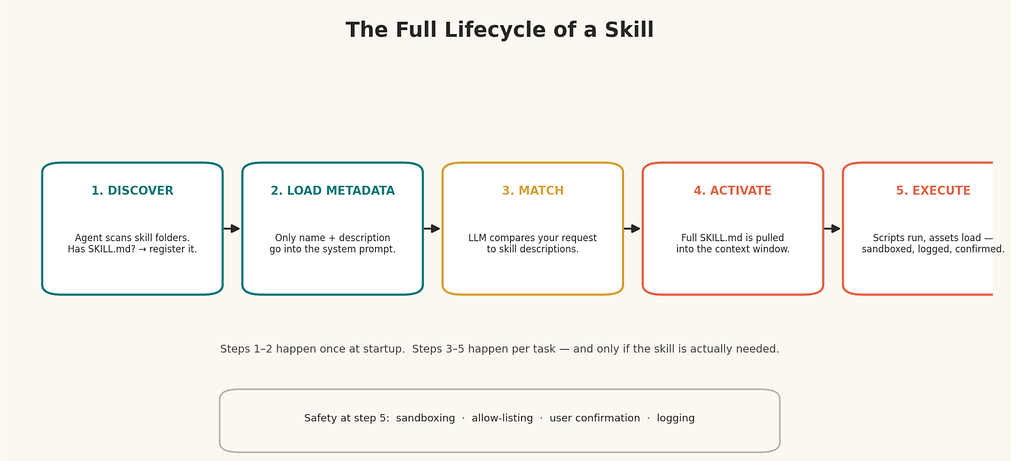
On startup, the agent walks its configured skill directories. Any subfolder holding a SKILL.md? Registered. Missing one? Ignored. Multiple directories merge into a single catalogue.
Next, it reads only the YAML header of each registered skill — never the body — and folds those names and descriptions into the hidden system prompt. This is why the description is the highest-stakes sentence you’ll author: at decision time, it is the only evidence the model has about what your skill can do.
Then comes matching, and this happens inside the model itself, not in the agent’s code. Your request and every skill description now share the same desk; the LLM weighs one against the others and picks — occasionally more than one skill applies, and that’s fine.
On a match, the agent activates the skill by loading the complete SKILL.md into context. The mechanics vary — a local agent may simply read the file from disk, a hosted one may expose it through a tool call — but the outcome is identical: the model now holds the full instructions.
Finally, execution. Guided by the instructions, the agent runs bundled scripts and pulls in templates or references as needed. This is also the moment your security posture matters most, because you’ve authorised software to act on your machine. Sandboxed execution, an allow-list of what may run, an explicit confirmation gate before anything destructive, and a log of every action taken — treat these as table stakes, not extras.
Discovery and metadata loading happen once per session. Matching, activation, and execution happen per task — and only when genuinely needed.
Writing skills people (and models) thank you for
Once the mechanics are clear, authoring reduces to three habits.
Write metadata for the matcher. Concrete triggers, real user phrasing, specific file types. If you wouldn’t be able to route on the description yourself, neither can the model.
Write the body for two readers. Structure it so an LLM can execute from it and a teammate can maintain it. If a section doesn’t change the agent’s behaviour, cut it.
Encode your domain, not just techniques. This is where the compounding returns are. The model already knows Python and SQL; what it doesn’t know is your naming conventions, your reconciliation rules, your client’s quirks. My standing rule since the team session: every new project gets a domain skill on day one. In my own work that has meant skills capturing things like how our reporting layer is structured and which validation steps precede any client-facing number — the tribal knowledge that otherwise gets re-explained in every single chat.
Taming the probabilistic beast
The hardest skills to write are the ones encoding a repeatable process. An LLM is a probability engine; “follow these eleven steps exactly” is fighting its nature. You can’t eliminate that, but you can constrain it, and the constraints all live in how you write the SKILL.md body.
Spell out branching decisions in plain conditional language — “if the user has supplied a template, do X; if not, offer Y” — rather than trusting the model to infer the fork. Break long processes into named stages, and for each stage state three things: what must be true to enter it, what happens inside it, and what “done” looks like. The exit condition matters more than you’d think; a probability engine has no internal counter, so “when the draft addresses all points gathered in stage one” beats “after a few iterations” every time. Describe the handover between stages too — how work in progress moves from one to the next.
Structure your iteration loops instead of leaving them open-ended: generate options, let the user pick, draft from the picks, then run a quality pass. Structured loops converge; freeform ones meander.
And build doors, not walls. A process skill should steer the user, never imprison them. Let them skip a stage on request. If frustration shows, have the skill acknowledge it and offer a shortcut. Handle context gaps the moment they appear instead of letting them pile up. When the skill is finished, test it the honest way — brand-new session, empty desk — because the blind spots invisible during authoring surface immediately in fresh context. Throughout, favour fewer, better iterations over fast, shallow ones.
Borrow before you build
Two closing practicalities. First, portability is real: I moved from Cursor to Windsurf recently, and my skill folders travelled with me untouched. Betting on an open standard pays off in exactly these unglamorous moments.
Second, you’re not the first person to need most skills. There’s a shared ecosystem now — skills.sh, Vercel’s public directory, lets you browse community- and company-published skills and install them with a single command. Check what exists before writing your own; adapt rather than originate where you can.
Where this leaves us
An agent without skills is a brilliant contractor with amnesia — capable, but re-briefed from zero every morning. Skills turn the briefing into an artefact: versionable, shareable, portable across tools, and loaded onto the model’s desk only at the moment it earns its place there. Start with one folder, one SKILL.md, one honest description. Your future sessions — and your teammates — inherit everything you put in it.
This article is also published on Medium.