AI Implementation Guide
Agentic Coding Workflows with Claude Code
Exploring how AI agents are transforming software development workflows
Agentic coding workflows with Claude Code : Part 1
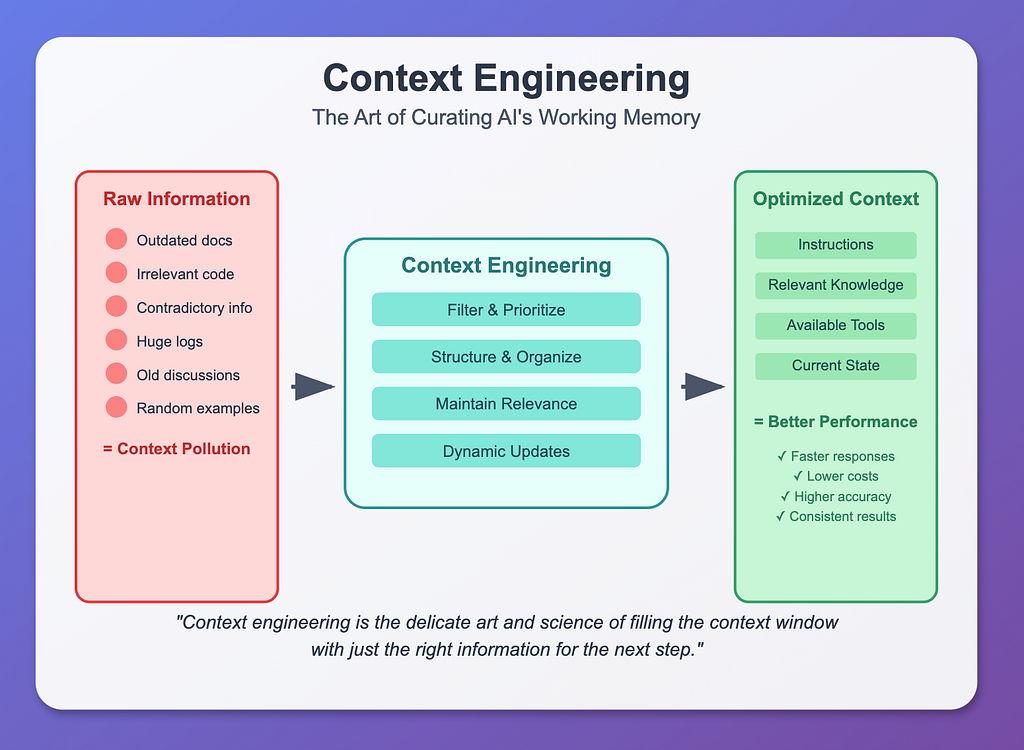
What is Context Engineering?
Context engineering is the strategic art of managing what information you provide to AI models to get the best possible results. Think of it as curating the perfect working memory for an AI system.
The Core Problem
Traditional prompts are static , they’re fixed instructions that don’t adapt. But modern AI agents need dynamic systems that can:
- Adapt to changing situations
- Include only relevant information
- Avoid information overload
- Maintain coherent reasoning across long tasks
Key Components of Context Engineering
- Instructions : What you want the AI to do
- Knowledge : Relevant background information
- Tools : Available functions and capabilities
- Memory/State : Previous interactions and current status
Common Context Problems
- Context Poisoning: Including irrelevant or contradictory information that confuses the AI and introduces hallucinations
- Context Confusion: When different parts of the context contradict each other, leading to inconsistent responses
- Context Overflow: Providing too much information, which increases costs, latency, and degrades performance
The Two Paths Forward
When building AI agents, you face a choice:
Path 1: Fixing Issues: Long Approach
- Keep asking the AI to fix problems
- Static prompts that don’t adapt
- Leads to repeated failures and frustration
Path 2: Smart Context Engineering : Short Approach
- Understand your codebase and the actual issue
- Provide targeted, relevant context
- Build dynamic systems that adapt
Why This Matters for AI Agents
Modern AI agents can:
- Reason through complex problems
- Invoke tools and run code
- Handle long running tasks
- Maintain state across interactions
But without proper context engineering, they become expensive, slow, and unreliable. The key is building systems that provide the right information at the right time not everything all at once.
Context engineering transforms AI from a basic question answering tool into a sophisticated reasoning partner that can tackle complex, multi step challenges efficiently.
Claude Code’s Context Engineering: From absract to concrete
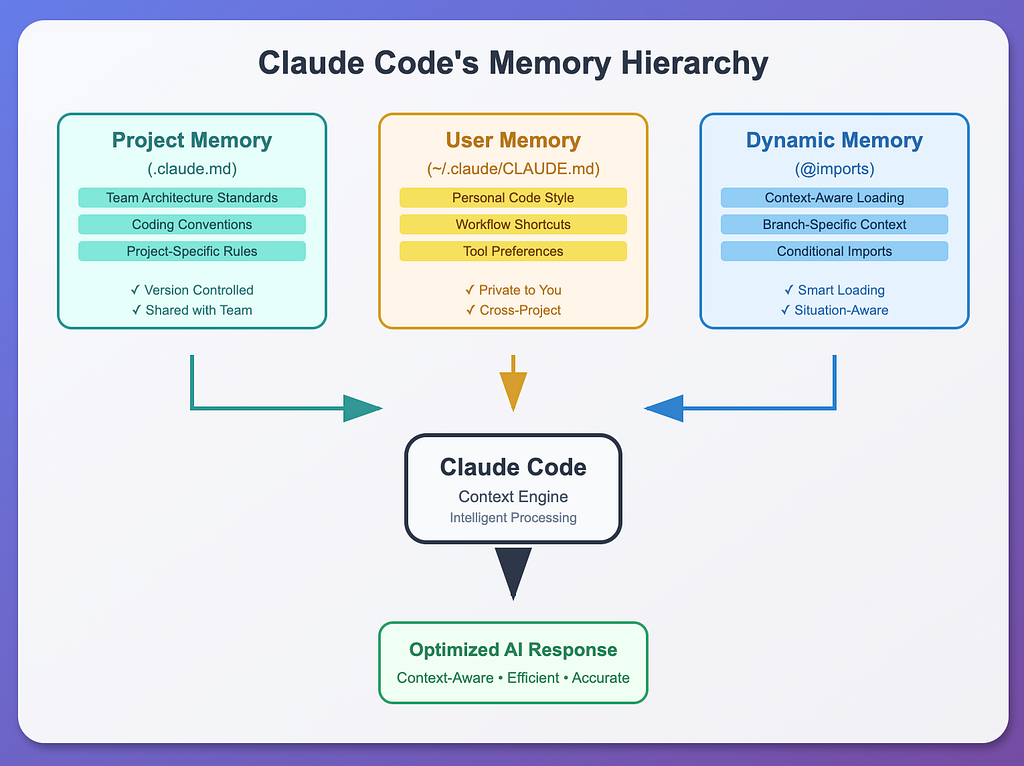
Claude Code transforms abstract context engineering concepts into concrete, practical systems. Here’s how it implements the four core strategies:
Strategy 1: Write Context — Building Persistent Memory
Claude Code uses three types of memory to create a comprehensive context foundation:
1) Project Memory (.claude.md)
This is your team’s shared knowledge base version-controlled and accessible to all team members. It contains:
- Architecture Overview: Your tech stack, frameworks, and system design
- Coding Standards: Team conventions, style guides, and best practices
- Project-specific Rules: How your team works together
Think of it as your project’s constitution , everyone follows the same rules.
2) User Memory (~/.claude/CLAUDE.md)
Your personal preferences that persist across all projects:
- Code Style: Your preferred patterns, naming conventions
- Workflow Shortcuts: Your favorite tools and testing approaches
- Personal Preferences: How you like to work with Claude Code
This file stays on your machine and never gets committed to version control — it’s your private workspace setup.
3) Dynamic Memory Imports
The real magic happens here. Instead of loading everything at once, Claude Code can selectively import contextual information using simple syntax:
# Import specific context files@path/to/memory/file.md@./relative/path/context.md@~/global/user/context.md
Conditional Context Loading: Claude Code can even load different contexts based on your current situation , like loading authentication context when you’re working on auth features, or payment context when working on billing.
Strategy 2: Select Context : Intelligent Context Retrieval
Instead of drowning Claude in information, the system is smart about what to include:
Automatic Context Discovery
- Smart Search: Automatically scans your project folders for relevant context files
- Inheritance: Gets context from parent folders but prioritizes specific information
- Prioritization: Focuses on recently used and frequently accessed information
Quick Context Addition
Use the # symbol to rapidly add information to Claude's memory during conversations. Claude automatically organizes this information by relevance and usefulness.
Tool-Aware Context
When Claude Code is about to use a specific tool, it remembers relevant guidelines:
- Before editing files: Check existing code patterns before making changes
- Before running commands: Check if package.json scripts exist before running raw commands
Strategy 3: Compress Context — Efficient Context Representation
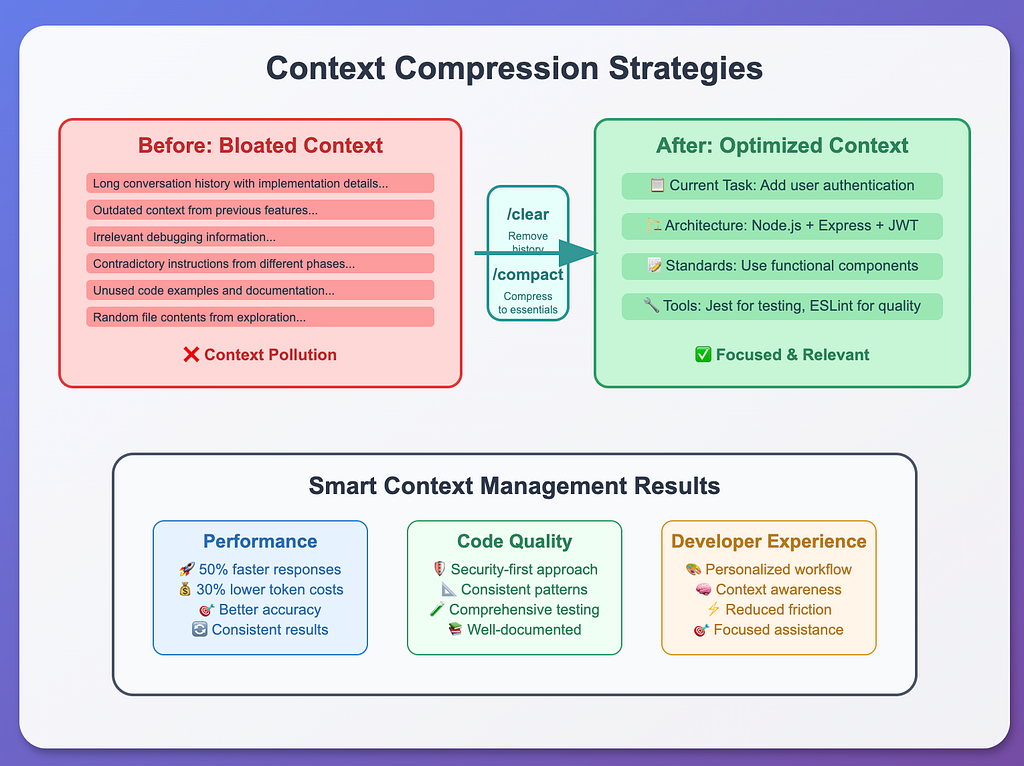
Claude Code includes built-in commands to manage context bloat:
/clear Command
- Purpose: Removes conversation history while preserving memory
- Use Case: Reset context window while maintaining project understanding
- When to Use: When context becomes cluttered with implementation details
/compact Command
- Purpose: Compresses conversation history into essential information
- Implementation: Summarizes previous interactions while maintaining key decisions
- Best Practice: Use regularly during long development sessions
Strategy 4: Isolate Context — Multi-Agent Specialization
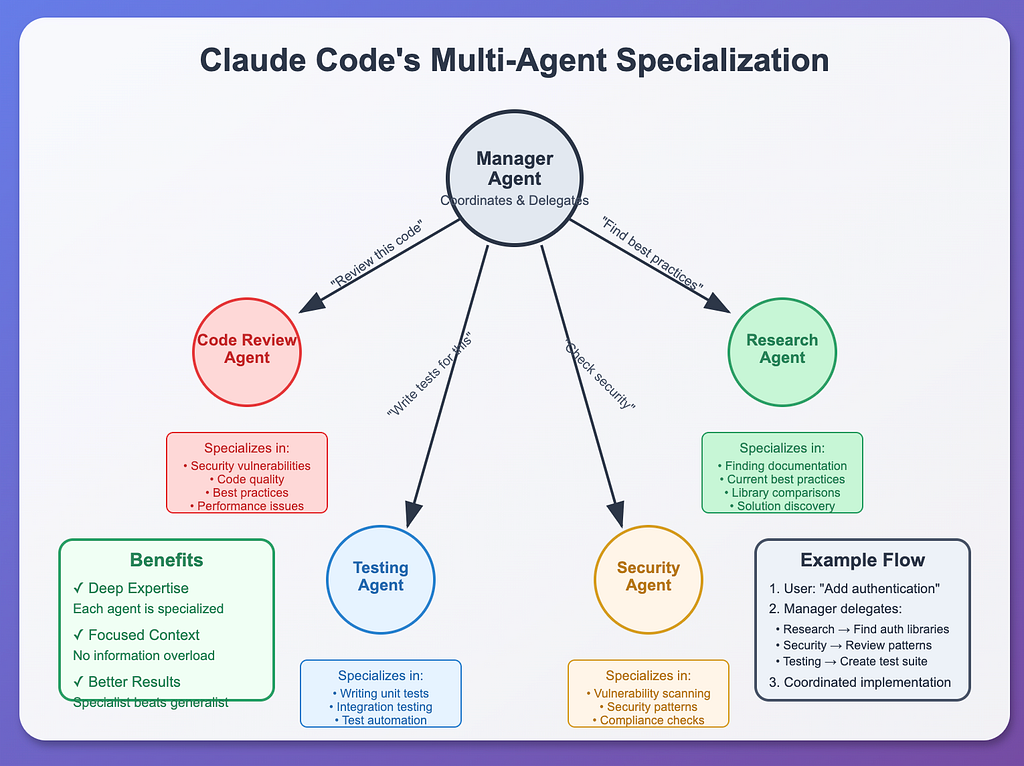
Rather than having one Claude try to do everything, Claude Code uses specialized agents:
The Manager Agent
The main Claude Code instance that coordinates and delegates tasks to specialized agents.
Specialized Agents
- Code Review Agent: Focuses only on security, quality, and best practices
- Research Agent: Finds current best practices and documentation
- Testing Agent: Specializes in writing and running tests
- Security Agent: Dedicated to identifying security vulnerabilities
Each specialist has focused knowledge in their domain, making them more effective than a generalist trying to handle everything.
I will post next parts of this blog in the coming days
Claude Code overview - Claude Docs
This article is also published on Medium.