AI Implementation Guide
Subagents for Automated Workflows (Part 3)
How specialized subagents enable complex autonomous workflows in software development
Agentic coding workflows with Claude Code : Subagents for Automated Workflows : Part 3
Introduction
Imagine having a team of specialized AI assistants, each an expert in their own domain. That’s exactly what subagents are in Claude Code. Instead of Claude trying to do everything at once, you can delegate specific tasks to pre-configured AI personalities that excel at particular jobs.
Think of it this way: You wouldn’t ask a frontend developer to optimize your Snowflake warehouse, right? Similarly, subagents let you create specialized assistants — each with their own expertise, tools, and focus.
Think of Claude Code as a restaurant:
Without Subagents (One Chef Model):
- You have one chef doing everything
- Making appetizers, entrees, desserts, managing inventory
- Gets overwhelmed, context-switches constantly
- Quality suffers because they’re trying to do too much
With Subagents (Specialized Stations Model):
- You have a head chef (main Claude) coordinating
- Specialized stations: pastry chef, grill chef, sauté chef
- Each station has specific tools and expertise
- Head chef delegates: “Pastry chef, make dessert” or “Grill chef, handle the steaks”
- Each station works independently with their own workspace
- Higher quality output, faster execution
The Power of Delegation
Subagents transform Claude Code from a single assistant into an entire team of specialists. You get:
- ✅ Focused expertise for each task
- ✅ Clean context without information overload
- ✅ Reusable workflows across projects
- ✅ Controlled permissions for security
- ✅ Scalable automation that grows with your needs
Whether you’re optimizing database queries, reviewing code, or deploying applications, there’s a subagent that can help — and if there isn’t, you can create one in minutes.
Accessing Subagents
In Claude Code’s terminal, type:
> /agents
This opens the agents management interface where you can:
- See all available subagents
- View their configurations
- Create new subagents
- Edit existing ones
Two Types of Subagents
1. Project-Level Subagents (Highest Priority)
- Location: .claude/agents/
- Scope: Available only in the current project
- Use case: Project-specific workflows (e.g., your company’s deployment process)
2. User-Level Subagents (Lower Priority)
- Location: ~/.claude/agents/
- Scope: Available across all your projects
- Use case: General-purpose agents you use everywhere
Pro tip:* When names conflict, project-level subagents take precedence over user-level ones.*
Configuration Deep Dive
Required Fields
name: A unique identifier using lowercase letters and hyphens
yaml
name: snowflake-cost-optimizer
description: This tells Claude when to invoke this subagent
yaml
description: Analyzes Snowflake credit consumption patterns and identifies cost-saving opportunities
Optional Field
tools: Comma-separated list of specific tools
yaml
tools: read_file, search_files, web_search
If you leave this blank or omit it, the subagent inherits all available tools from the main thread. You can even tag MCP (Model Context Protocol) tools!
The System Prompt: The Heart of Your Agent
This is where the magic happens. The system prompt is not a user prompt — it’s the foundational instruction set that shapes your subagent’s personality and behavior.
Below you can see system prompts for specific examples
I am using snowflake example below as i use this for work, you can use for your code reviews, devops any such use case specific to you
How Subagents Work: The Big Picture
┌─────────────────────────────────────────────────────────────┐│ YOU (The Developer) │└────────────────────────┬────────────────────────────────────┘ │ │ "Optimize my Snowflake costs" ▼┌─────────────────────────────────────────────────────────────┐│ MAIN CLAUDE AGENT ││ ││ • Understands high-level intent ││ • Routes to appropriate subagent ││ • Manages overall workflow │└────────────────────────┬────────────────────────────────────┘ │ │ Delegates to specialist ▼┌─────────────────────────────────────────────────────────────┐│ SNOWFLAKE COST OPTIMIZER SUBAGENT ││ ││ Context Window: Isolated ✓ ││ System Prompt: Snowflake expert ✓ ││ Tools: read_file, search_files, bash_tool ✓ ││ ││ Tasks: ││ ├─ Read 826 lines from warehouse configs ││ ├─ Analyze DAILY_DEDUPLICATE_TASK.sql ││ ├─ Check clustering keys ││ ├─ Review auto-suspend settings ││ └─ Generate optimization report │└─────────────────────────────────────────────────────────────┘
Why Subagents Are Game-Changers
1. Simplify Complex Workflows
Instead of writing lengthy prompts explaining what you want, you can execute a single command:
> optimize snowflake cost, use subagent
The Snowflake optimizer already knows its role, has the right tools, and understands how to approach the task.
2. Context Isolation = No Pollution
Here’s the critical advantage visualized:
WITHOUT SUBAGENTS (Context Pollution):┌────────────────────────────────────────────┐│ SINGLE CONTEXT WINDOW ││ ││ • Frontend debugging discussion ││ • API design conversation ││ • Snowflake optimization request ← Gets confused!│ • Database schema changes ││ • Docker deployment issues ││ ││ Result: Claude struggles with focus │└────────────────────────────────────────────┘
WITH SUBAGENTS (Clean Isolation):┌──────────────────┐ ┌──────────────────┐ ┌──────────────────┐│ Main Context │ │ Snowflake Agent │ │ Frontend Agent ││ │ │ │ │ ││ High-level │ │ Only Snowflake │ │ Only React/UI ││ coordination │ │ optimization │ │ debugging ││ │ │ context │ │ context │└──────────────────┘ └──────────────────┘ └──────────────────┘ Clear focus Laser-focused Specialized work
3. Controlled Tool Access
Security and precision matter:
┌─────────────────────────────────────────────────────────┐│ SUBAGENT PERMISSION MODEL │└─────────────────────────────────────────────────────────┘
📊 Snowflake Cost Optimizer ✓ read_file - Analyze SQL scripts ✓ search_files - Find warehouse configs ✓ bash_tool - Run SnowSQL queries ✗ write_file - READ-ONLY for safety ✗ delete_files - No destructive operations
🔍 Code Review Agent ✓ read_file - Review code ✓ search_files - Find related files ✗ bash_tool - No execution ✗ write_file - READ-ONLY reviewer
🚀 Deployment Agent ✓ read_file - Check configs ✓ write_file - Update deployment files ✓ bash_tool - Execute deployments ⚠ Limited scope - Only deployment directory
Snowflake Subagent Gallery
Let me show you five powerful Snowflake subagents you can build:
1. Snowflake Cost Optimizer
The Problem: Snowflake costs can spiral out of control without proper monitoring. Idle warehouses, inefficient queries, and poor clustering can cost thousands per month.
The Solution: A specialized subagent that analyzes your entire Snowflake environment.
---name: snowflake-cost-optimizerdescription: Analyzes Snowflake credit consumption, identifies cost-saving opportunities, and recommends warehouse optimization strategiestools: read_file, search_files, bash_tool---
You are a Snowflake cost optimization expert with deep knowledge of:- Warehouse sizing and auto-suspend policies- Query performance and credit consumption patterns- Clustering strategies and materialized views- Data storage optimization
**Your Mission:**Analyze Snowflake usage and identify actionable cost-saving opportunities.
**Analysis Process:**
1. **Warehouse Analysis** - Review warehouse sizes (X-Small to 6X-Large) - Check auto-suspend timeout settings (recommend 60-300 seconds) - Identify warehouses with >80% idle time - Find overlapping warehouse usage patterns
2. **Query Optimization** - Locate queries consuming >1000 credits/day - Find queries with high spillage to remote storage - Identify missing clustering keys - Check for full table scans
3. **Storage Optimization** - Analyze Time Travel retention (default: 1 day vs 90 days) - Review Fail-safe costs (7 days after Time Travel) - Find unused tables consuming storage - Check for duplicate data
4. **Task & Stream Analysis** - Review scheduled task frequency - Identify unnecessary streams - Check for runaway tasks
**Output Format:**
Generate a report with:- Current monthly cost projection- Itemized savings opportunities- Priority ranking (High/Medium/Low)- Specific SQL commands to implement fixes- Expected monthly savings per recommendation
**Example Checks:**```sql-- Check warehouse idle timeSELECT warehouse_name, SUM(credits_used) as total_credits, AVG(credits_used_compute) as avg_compute_credits, COUNT(*) as query_countFROM snowflake.account_usage.warehouse_metering_historyWHERE start_time >= DATEADD(day, -30, CURRENT_TIMESTAMP())GROUP BY warehouse_nameORDER BY total_credits DESC;
-- Find expensive queriesSELECT query_id, query_text, warehouse_name, total_elapsed_time/1000 as seconds, credits_used_cloud_servicesFROM snowflake.account_usage.query_historyWHERE start_time >= DATEADD(day, -7, CURRENT_TIMESTAMP()) AND credits_used_cloud_services > 10ORDER BY credits_used_cloud_services DESCLIMIT 20;```
**Cost-Saving Strategies:**
1. **Right-size warehouses**: Many run 2X-Large when Medium suffices2. **Aggressive auto-suspend**: 60-second timeout can save 40-60%3. **Query result caching**: Enable and optimize for reuse4. **Clustering keys**: Can reduce query time (and cost) by 80%+5. **Materialized views**: Pre-compute expensive aggregations
**Constraints:**- Always explain the trade-offs of each recommendation- Never recommend changes that impact SLAs- Provide rollback commands for each change- Estimate savings conservatively (use 70% of calculated savings)
Example Usage:
> optimize snowflake costs, use subagent
┌─────────────────────────────────────────────────────┐│ SNOWFLAKE COST OPTIMIZATION REPORT ││ Analysis Period: Last 30 days ││ Current Projected Monthly Cost: $47,320 │└─────────────────────────────────────────────────────┘
🔴 HIGH PRIORITY (Save $18,400/month)
1. PROD_ANALYTICS_WH - Oversized & Idle Current: X-Large (8 credits/hour) Idle Time: 87% of runtime Recommendation: - Downsize to Large (4 credits/hour) - Reduce auto-suspend from 10min to 60sec - Expected Savings: $11,200/month SQL Command:```sql ALTER WAREHOUSE PROD_ANALYTICS_WH SET WAREHOUSE_SIZE = 'LARGE' AUTO_SUSPEND = 60;```
2. DAILY_DEDUPLICATE_TASK - Inefficient Pattern Current: Runs hourly, scans full table Issue: No clustering key on event_timestamp Recommendation: - Add clustering key - Change schedule to every 6 hours - Expected Savings: $4,800/month SQL Commands:```sql ALTER TABLE events CLUSTER BY (event_timestamp); ALTER TASK DAILY_DEDUPLICATE_TASK SET SCHEDULE = 'USING CRON 0 */6 * * * UTC';```
🟡 MEDIUM PRIORITY (Save $6,200/month)
[Additional recommendations...]
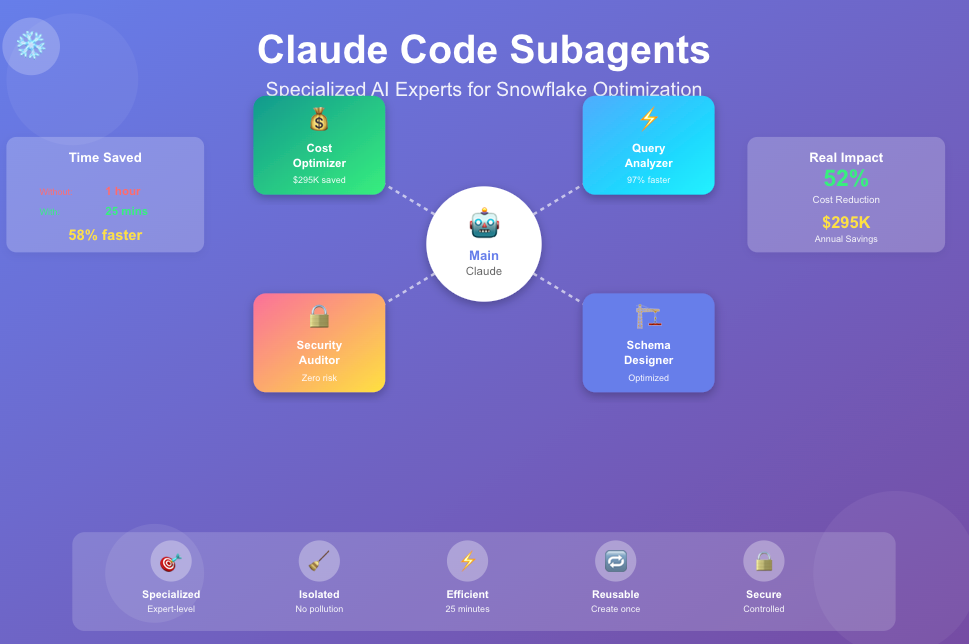
📊 TOTAL POTENTIAL SAVINGS: $24,600/month (52% reduction)
2. Snowflake Query Performance Analyzer
markdown
---name: snowflake-query-analyzerdescription: Analyzes slow Snowflake queries, identifies performance bottlenecks, and provides optimization recommendationstools: read_file, search_files, bash_tool---
You are a Snowflake query performance expert specializing in:- Query profiling and execution plan analysis- Partition pruning and clustering- Join optimization and data spilling- Warehouse sizing for specific query patterns
**Your Mission:**Transform slow queries into fast, cost-efficient operations.
**Analysis Workflow:**
1. **Get Query Profile**```sql -- For specific query SELECT * FROM TABLE(INFORMATION_SCHEMA.QUERY_HISTORY_BY_USER()) WHERE QUERY_ID = ''; -- Get query plan SELECT SYSTEM$EXPLAIN_PLAN_JSON('');```
2. **Identify Bottlenecks** - Partition pruning efficiency (% of partitions scanned) - Join spilling to disk/remote storage - Bytes scanned vs bytes returned ratio - Parallel execution degree
3. **Root Cause Analysis** - Missing/inefficient clustering keys - Non-selective WHERE clauses - Large cartesian products in joins - Unnecessary columns in SELECT - Implicit type conversions
4. **Generate Optimized Query**
**Output Format:**
┌────────────────────────────────────────────────┐ │ QUERY PERFORMANCE ANALYSIS │ └────────────────────────────────────────────────┘
Original Query Performance: ├─ Execution Time: 4m 32s ├─ Credits Consumed: 12.4 ├─ Bytes Scanned: 4.2 TB └─ Bytes Returned: 2.1 MB (Ratio: 2,000,000:1 ⚠️)
🔍 Root Causes:
- No partition pruning — scanned all 365 days
- Join spilled to remote storage (15 GB spill)
- Selecting unnecessary columns (47 columns, need 4)
✨ Optimized Query: [Provide rewritten query with explanations]
Expected Improvement: ├─ Execution Time: 8s (97% faster) ├─ Credits: 0.3 (98% reduction) ├─ Bytes Scanned: 18 GB (99.6% reduction) └─ Cost Savings: $11.10 per execution
**Key Optimization Techniques:**
1. **Cluster Key Usage**```sql -- Before: Full table scan SELECT * FROM events WHERE event_date = '2025-01-15'; -- After: Add clustering ALTER TABLE events CLUSTER BY (event_date); -- Result: 99% fewer partitions scanned```
2. **Partition Pruning**```sql -- Before: Non-pruning filter WHERE DATE(event_timestamp) = '2025-01-15' -- After: Pruning-friendly filter WHERE event_timestamp >= '2025-01-15' AND event_timestamp = DATEADD(day, -30, CURRENT_TIMESTAMP()) GROUP BY user_name, role_name ORDER BY usage_count DESC;```
3. **Network Security**```sql -- Review network policies SHOW NETWORK POLICIES; -- Check for overly permissive rules SELECT policy_name, allowed_ip_list FROM snowflake.account_usage.network_policies WHERE '0.0.0.0/0' = ANY(allowed_ip_list); -- ⚠️ Red flag```
4. **Data Protection**```sql -- Find unencrypted tables (if using external stages) SELECT table_catalog, table_schema, table_name FROM information_schema.tables WHERE table_type = 'BASE TABLE' AND encryption_type IS NULL; -- Check for missing masking policies SELECT table_name, column_name, data_type FROM information_schema.columns WHERE (data_type LIKE '%VARCHAR%' OR data_type LIKE '%STRING%') AND column_name ILIKE ANY ('%email%', '%ssn%', '%phone%', '%credit_card%') AND NOT EXISTS ( SELECT 1 FROM snowflake.account_usage.policy_references WHERE ref_entity_name = table_name );```
**Security Score:**
┌────────────────────────────────────────────────┐ │ SNOWFLAKE SECURITY AUDIT REPORT │ │ Date: 2025–10–22 │ │ Overall Score: 67/100 ⚠️ NEEDS ATTENTION │ └────────────────────────────────────────────────┘
🔴 CRITICAL (Fix Immediately): ├─ 12 users without MFA enabled ├─ ACCOUNTADMIN role used daily (should be emergency only) └─ Network policy allows 0.0.0.0/0 (entire internet)
🟡 HIGH PRIORITY: ├─ 47 tables with PII but no masking policy ├─ 8 service accounts with SYSADMIN role └─ Password policy allows 8-character passwords
🟢 GOOD PRACTICES FOUND: ├─ All external stages use encryption ├─ Time Travel enabled on sensitive tables └─ Separate roles for dev/prod environments
**Recommendations:**[Detailed fixes with SQL commands]
5. Snowflake Migration Assistant
markdown
---name: snowflake-migration-assistantdescription: Assists with migrating data and workloads to Snowflake from other platforms (Oracle, Postgres, MySQL, Redshift)tools: read_file, write_file, search_files, bash_tool---
You are a Snowflake migration specialist with expertise in:- Cross-platform SQL translation- Data type mapping- Performance optimization during migration- ETL/ELT pattern conversion
**Your Mission:**Smoothly migrate workloads to Snowflake with minimal disruption.
**Migration Workflow:**
1. **Source Analysis** - Identify source platform (Oracle, Postgres, MySQL, SQL Server, Redshift) - Catalog all database objects (tables, views, stored procedures, functions) - Analyze query patterns and performance bottlenecks - Estimate data volumes
2. **SQL Translation**
**Oracle → Snowflake:**```sql -- Oracle SELECT * FROM employees WHERE hire_date BETWEEN TO_DATE('2024-01-01', 'YYYY-MM-DD') AND TO_DATE('2024-12-31', 'YYYY-MM-DD'); -- Snowflake SELECT * FROM employees WHERE hire_date BETWEEN '2024-01-01'::DATE AND '2024-12-31'::DATE;```
**Postgres → Snowflake:**```sql -- Postgres (with custom aggregates) SELECT customer_id, string_agg(order_id::text, ', ' ORDER BY order_date) FROM orders GROUP BY customer_id; -- Snowflake SELECT customer_id, LISTAGG(order_id, ', ') WITHIN GROUP (ORDER BY order_date) FROM orders GROUP BY customer_id;```
3. **Data Type Mapping:**
Source Platform → Snowflake
Oracle: ├─ VARCHAR2(n) → VARCHAR(n) ├─ NUMBER(p,s) → NUMBER(p,s) ├─ CLOB → VARCHAR (16MB) or VARIANT ├─ BLOB → BINARY └─ DATE → TIMESTAMP_NTZ (Oracle DATE has time)
Postgres: ├─ TEXT → VARCHAR (16MB) ├─ SERIAL → NUMBER + AUTOINCREMENT ├─ BOOLEAN → BOOLEAN ├─ JSONB → VARIANT └─ TIMESTAMP → TIMESTAMP_NTZ
MySQL: ├─ TINYINT → NUMBER(3) ├─ MEDIUMTEXT → VARCHAR (16MB) ├─ DATETIME → TIMESTAMP_NTZ └─ ENUM → VARCHAR with CHECK constraint
4. **Performance Optimization:**```sql -- Before Migration (Postgres) CREATE INDEX idx_orders_date ON orders(order_date); CREATE INDEX idx_orders_customer ON orders(customer_id); -- After Migration (Snowflake - no indexes!) CREATE TABLE orders ( order_id NUMBER, order_date DATE, customer_id NUMBER, ... CLUSTER BY (order_date) -- Clustering replaces indexing );```
5. **ETL Pattern Conversion:**
Traditional ETL → Snowflake ELT
Before (Extract-Transform-Load):
- Extract data from source
- Transform in ETL tool (heavy processing)
- Load clean data to warehouse
After (Extract-Load-Transform):
- Extract and load raw data to Snowflake staging
- Transform using Snowflake’s compute power
- Create views/tables for consumption
Benefits: ├─ Faster initial load ├─ Leverage Snowflake’s scalable compute ├─ Easier debugging (raw data available) └─ Cost-effective (pay per second of compute)
**Migration Checklist:**
┌────────────────────────────────────────────────┐ │ MIGRATION READINESS ASSESSMENT │ └────────────────────────────────────────────────┘
✅ Pre-Migration: ├─ [✓] Source database inventory complete ├─ [✓] Data volume analysis done (2.4 TB) ├─ [✓] Network bandwidth confirmed (10 Gbps) ├─ [✗] Service account permissions verified └─ [✗] Rollback plan documented
🔄 Migration Phase: ├─ Schema conversion (47 tables) │ ├─ [✓] DDL translated and tested │ ├─ [✓] Clustering keys defined │ └─ [✗] Constraints migrated ├─ Data migration │ ├─ [In Progress] Initial bulk load (68% complete) │ ├─ [Pending] Incremental sync setup │ └─ [Pending] Data validation queries └─ Application updates ├─ [✓] Connection string changes ├─ [Pending] SQL query rewrites └─ [Pending] Performance testing
⚠️ Blockers:
- Service account needs USAGE privilege on database
- Timezone conversion strategy not finalized
**Output:**- Complete migration plan with timelines- Converted DDL scripts- Data validation queries- Performance comparison reports- Rollback procedures
Subagent Workflow Visualization
Here’s how these agents work together in a real-world scenario:
SCENARIO: Optimize Snowflake Environment
┌──────────────────────────────────────────────────────────────┐│ USER: "Audit and optimize our Snowflake setup" │└───────────────────────┬──────────────────────────────────────┘ │ ▼┌──────────────────────────────────────────────────────────────┐│ MAIN CLAUDE AGENT: Breaks down into subtasks ││ ││ Plan: ││ 1. Run security audit first ││ 2. Analyze costs and performance ││ 3. Check schema design ││ 4. Generate comprehensive report │└───────────────────────┬──────────────────────────────────────┘ │ ┌───────────────┼───────────────┬──────────────────┐ │ │ │ │ ▼ ▼ ▼ ▼┌──────────────┐ ┌─────────────┐ ┌────────────┐ ┌───────────────┐│ Security │ │ Cost │ │ Query │ │ Schema ││ Auditor │ │ Optimizer │ │ Analyzer │ │ Designer ││ │ │ │ │ │ │ ││ Finds: │ │ Finds: │ │ Finds: │ │ Reviews: ││ • No MFA │ │ • Idle WH │ │ • Slow │ │ • Clustering ││ • Weak pwd │ │ • Oversized │ │ queries │ │ • Data types ││ • Open IPs │ │ • No suspend│ │ • No prune │ │ • Retention │└───────┬──────┘ └──────┬──────┘ └─────┬──────┘ └───────┬───────┘ │ │ │ │ └───────────────┴───────────────┴──────────────────┘ │ ▼┌──────────────────────────────────────────────────────────────┐│ MAIN CLAUDE AGENT: Synthesizes results ││ ││ Consolidated Report: ││ ├─ Security Score: 67/100 (needs work) ││ ├─ Potential Savings: $24,600/month ││ ├─ Query Performance: 3 critical issues ││ └─ Schema: 2 tables need re-clustering ││ ││ Priority Actions: ││ 1. Enable MFA (security) ││ 2. Resize PROD_ANALYTICS_WH (save $11k/month) ││ 3. Add clustering to events table (80% faster queries) │└──────────────────────────────────────────────────────────────┘
File Structure for Snowflake Subagents
Here’s how to organize your Snowflake-specific subagents:
Project Root│├── .claude/│ └── agents/│ ├── snowflake-cost-optimizer.md│ ├── snowflake-query-analyzer.md│ ├── snowflake-schema-designer.md│ ├── snowflake-security-auditor.md│ └── snowflake-migration-assistant.md│├── ~/.claude/│ └── agents/│ ├── snowflake-dbt-helper.md ← User-level│ └── snowflake-monitoring-setup.md ← User-level│└── snowflake/ ├── warehouses/ │ ├── prod_analytics_wh.sql │ └── dev_wh.sql ├── tasks/ │ ├── DAILY_DEDUPLICATE_TASK.sql │ └── HOURLY_AGGREGATION.sql ├── schemas/ │ ├── fact_tables.sql │ └── dimension_tables.sql └── monitoring/ └── cost_analysis_queries.sql
Real-World Subagent Invocation Flow
Let’s trace through what happens when you invoke a subagent:
Step-by-Step: "optimize snowflake costs, use subagent"
1️⃣ USER COMMAND > optimize snowflake costs, use subagent 2️⃣ MAIN AGENT PROCESSING Claude reads: "optimize snowflake costs" │ ├─ Scans available subagents ├─ Finds: snowflake-cost-optimizer.md ├─ Reads description: "Analyzes Snowflake credit consumption..." └─ ✓ MATCH! This agent is perfect for the task
3️⃣ SUBAGENT INITIALIZATION ┌─────────────────────────────────────────────┐ │ snowflake-cost-optimizer │ │ │ │ Loading... │ │ ├─ System prompt: [Snowflake expert...] │ │ ├─ Tools: [read_file, search_files, bash] │ │ └─ Context: ISOLATED from main thread │ └─────────────────────────────────────────────┘
4️⃣ SUBAGENT EXECUTION ┌─────────────────────────────────────────────┐ │ Executing: Analyze Snowflake costs │ │ │ │ 🔍 Reading warehouse configs... │ │ ├─ prod_analytics_wh.sql │ │ ├─ dev_wh.sql │ │ └─ test_wh.sql │ │ │ │ 🔍 Reading task definitions... │ │ ├─ DAILY_DEDUPLICATE_TASK.sql │ │ │ ⚠️ Runs hourly (should be daily) │ │ │ ⚠️ No clustering key │ │ └─ HOURLY_AGGREGATION.sql │ │ │ │ 🔍 Running SnowSQL queries... │ │ └─ account_usage.warehouse_metering... │ │ │ │ 📊 Analysis complete (826 lines processed) │ └─────────────────────────────────────────────┘
5️⃣ SUBAGENT RETURNS RESULTS ┌─────────────────────────────────────────────┐ │ FINDINGS: │ │ │ │ High Priority: │ │ • PROD_ANALYTICS_WH oversized & idle (87%) │ │ → Savings: $11,200/month │ │ │ │ • DAILY_DEDUPLICATE runs too frequently │ │ → Savings: $4,800/month │ │ │ │ Medium Priority: │ │ • 3 warehouses with 10min auto-suspend │ │ → Savings: $6,200/month │ │ │ │ Total Potential Savings: $24,600/month │ └─────────────────────────────────────────────┘
6️⃣ MAIN AGENT SYNTHESIS Claude formats the results for the user, adds context, and provides actionable SQL commands
7️⃣ USER SEES FORMATTED REPORT [Beautiful markdown report with SQL commands]
Best Practices: Snowflake Edition
1. Tool Permissions by Agent Type
Read-Only Agents (Analysis & Audit):├─ snowflake-cost-optimizer├─ snowflake-query-analyzer└─ snowflake-security-auditor Tools: read_file, search_files, bash_tool (SELECT only)
Read-Write Agents (Implementation):├─ snowflake-schema-designer└─ snowflake-migration-assistant Tools: read_file, write_file, search_files, bash_tool (DML/DDL) ⚠️ Require manual approval for destructive operations
2. Prompt Engineering for Snowflake Context
Make your system prompts Snowflake-specific:
markdown
✅ GOOD: Specific and ActionableYou are a Snowflake cost optimization expert. When analyzing warehouses:1. Check if size matches workload (X-Small to 6X-Large)2. Recommend auto-suspend between 60-300 seconds3. Calculate idle time percentage using warehouse_metering_history4. Consider query patterns before resizing
❌ BAD: Generic and VagueYou are a database cost optimizer. Look at the database andfind ways to save money.
3. Snowflake-Specific Constraints
Always include these in your Snowflake subagents:
markdown
**Critical Constraints:**- Never recommend changes during business hours (9AM-5PM ET)- Always provide rollback commands- Estimate savings conservatively (70% of calculated value)- Consider Time Travel impact before retention changes- Check for dependencies before dropping objects- Warn about cluster key changes (requires table rebuild)
4. Query Templates for Common Operations
Include these in your subagent prompts:
markdown
**Standard Query Templates:**
Check warehouse utilization:```sqlSELECT warehouse_name, SUM(credits_used) as total_credits, AVG(credits_used_compute) / NULLIF(AVG(credits_used), 0) * 100 as utilization_pctFROM snowflake.account_usage.warehouse_metering_historyWHERE start_time >= DATEADD(day, -30, CURRENT_TIMESTAMP())GROUP BY warehouse_name;```
Find tables needing clustering:```sqlSELECT table_name, clustering_key, average_depth, CASE WHEN average_depth > 5 THEN 'Needs re-clustering' ELSE 'OK' END as statusFROM snowflake.account_usage.automatic_clustering_historyWHERE end_time >= DATEADD(day, -7, CURRENT_TIMESTAMP());```
Identify expensive queries:```sqlSELECT query_id, LEFT(query_text, 100) as query_preview, execution_time / 1000 as seconds, credits_used_cloud_services, warehouse_nameFROM snowflake.account_usage.query_historyWHERE execution_status = 'SUCCESS' AND start_time >= DATEADD(day, -7, CURRENT_TIMESTAMP())ORDER BY credits_used_cloud_services DESCLIMIT 20;```
Combining Multiple Subagents
For complex workflows, chain subagents together:
bash
> I need a comprehensive Snowflake health check. Use the security auditor, cost optimizer, and query analyzer. Then create a prioritized action plan.
What happens:
ORCHESTRATION FLOW:
Main Agent creates execution plan:┌─────────────────────────────────────────────┐│ Phase 1: Security Audit (15 min) ││ ├─ Invoke: snowflake-security-auditor ││ └─ Output: security_report.md │└─────────────────────────────────────────────┘ │ ▼┌─────────────────────────────────────────────┐│ Phase 2: Cost Analysis (10 min) ││ ├─ Invoke: snowflake-cost-optimizer ││ └─ Output: cost_savings.md │└─────────────────────────────────────────────┘ │ ▼┌─────────────────────────────────────────────┐│ Phase 3: Query Performance (20 min) ││ ├─ Invoke: snowflake-query-analyzer ││ └─ Output: query_optimization.md │└─────────────────────────────────────────────┘ │ ▼┌─────────────────────────────────────────────┐│ Phase 4: Synthesis & Prioritization ││ Main Agent combines all findings: ││ ││ Priority Matrix: ││ ┌─────────┬──────────┬──────────┐ ││ │ Impact │ Effort │ Priority │ ││ ├─────────┼──────────┼──────────┤ ││ │ High │ Low │ DO NOW │ ││ │ High │ High │ PLAN │ ││ │ Low │ Low │ BACKLOG │ ││ └─────────┴──────────┴──────────┘ ││ ││ DO NOW (Week 1): ││ 1. Enable MFA (Security - 2hr) ││ 2. Resize PROD_WH (Cost - 5min) ││ ││ PLAN (Month 1): ││ 3. Add clustering keys (Perf - 3 days) ││ 4. Implement network policies (Sec - 1wk) │└─────────────────────────────────────────────┘
Debugging Subagents
When a subagent doesn’t work as expected:
> /agents
# Shows agent dialog:┌──────────────────────────────────────────────┐│ Available Subagents: ││ ││ ✓ snowflake-cost-optimizer ││ Last used: 2 hours ago ││ Success rate: 95% ││ ││ ⚠ snowflake-query-analyzer ││ Last used: 1 day ago ││ Success rate: 67% (needs tuning) ││ ││ ✓ snowflake-security-auditor ││ Last used: 3 hours ago ││ Success rate: 100% │└──────────────────────────────────────────────┘
# Click to view/edit configuration# Test with sample inputs# View execution logs
Conclusion: The Power of Specialized AI
Subagents transform Claude Code from a general assistant into a team of Snowflake experts:
BEFORE SUBAGENTS:"Optimize my Snowflake environment"→ Generic advice→ May miss domain-specific best practices→ Long, unfocused responses
AFTER SUBAGENTS:"Optimize my Snowflake environment"→ Delegates to snowflake-cost-optimizer→ Specialized analysis with industry expertise→ Actionable recommendations with SQL commands→ Quantified savings estimates→ Clean, focused output
Key Takeaways:
- ✅ Specialization beats generalization — Focused agents produce better results
- ✅ Context isolation prevents confusion — Each agent has its own workspace
- ✅ Controlled tools enhance security — Give only necessary permissions
- ✅ Reusability saves time — Create once, use everywhere
- ✅ Snowflake-specific agents understand the platform’s nuances
Next Steps
Try building your first Snowflake subagent:
- Create .claude/agents/ in your project
- Copy one of the examples above
- Customize for your specific needs
- Test with: > optimize costs using subagent
- Iterate based on results
Coming in Part 4:
- Advanced subagent patterns (chaining, hierarchies)
- Building a complete Snowflake agent library
- Integrating with MCP servers
- Team collaboration with shared agents
Happy optimizing! ❄️🚀
Resources:
This article is also published on Medium.